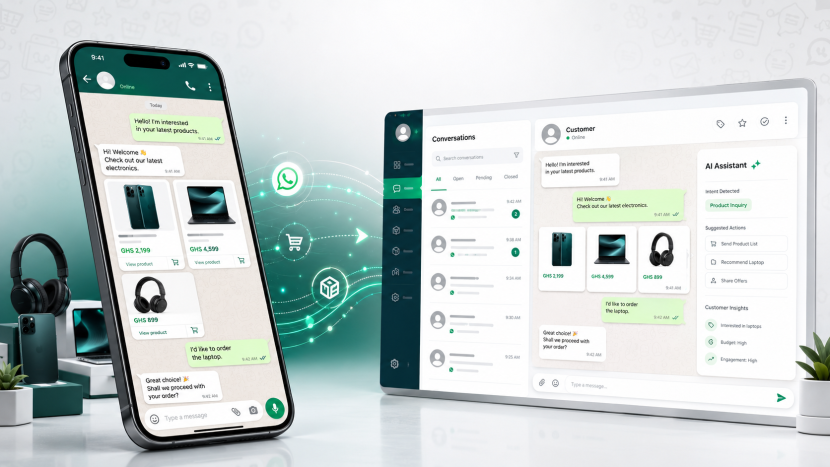
WhatsApp AI Agent Prompt

WhatsApp AI Agent Prompt

WhatsApp AI  Agent Prompt
 
Build a production-ready WhatsApp sales agent for an electronics store called **Masyn-Shop** (Ghana, prices in GHS). Customers shop via WhatsApp; staff manage conversations on a web dashboard styled like WhatsApp Web.
 
Do NOT use n8n or Zapier. The Next.js app owns webhook handling, AI replies, orders, and the dashboard.
 
---
 
## Product summary
 
**Masyn-Shop** sells electronics: phones, laptops, tablets, audio, TVs, gaming, accessories.
 
The AI assistant (**Maya** by default) should:
1. Help customers browse and search products
2. Recommend up to 3 products per message (name, GHS price, benefit, stock)
3. Show full specs when they pick a product
4. Guide checkout: quantity → delivery address → payment method → confirm
5. Create orders with a reference like `MS-20250520-A1B2`
6. Look up order status by reference
7. Escalate to a human for refunds, complaints, bulk B2B
 
Never invent products or prices — only use catalog data from tools.
 
---
 
## Architecture
 

Customer WhatsApp message → Meta POST /api/webhook → Store message in MongoDB → If conversation.mode ==="agent": run tool-using AI agent → Send reply via Meta Graph API → Store assistant message (source: "ai" or "human") → Dashboard polls REST API every ~2.5s

 
Return **200 to Meta within 5 seconds**. Process AI in the same request or ensure fast enough to avoid retries.
 
---
 
## Tech stack
 
- **Next.js 16+** (App Router, TypeScript)
- **MongoDB + Mongoose** (`MONGODB_URI`)
- **AI:** OpenRouter and/or OpenAI via the `openai` npm package (OpenAI-compatible SDK)
- **Tailwind CSS** — WhatsApp Web–style UI (light theme, green header `#075e54`, chat wallpaper, bubbles)
- **Deploy:** Vercel + ngrok for local webhook testing
 
Read Next.js 16 docs in `node_modules/next/dist/docs/` — APIs may differ from older versions.
 
---
 
## Environment variables (.env.example)
 
```env
# Meta WhatsApp
WHATSAPP_ACCESS_TOKEN=
WHATSAPP_PHONE_NUMBER_ID= # MUST match webhook metadata.phone_number_id
WHATSAPP_VERIFY_TOKEN=
 
# AI (at least one key)
OPENROUTER_API_KEY=
OPENAI_API_KEY=
AI_PROVIDER=openrouter|openai # only if both keys set
AI_MODEL=openai/gpt-4o-mini # OpenRouter slug OR gpt-4o-mini for native OpenAI
 
# Masyn-Shop business (injected into system prompt)
AGENT_NAME=Maya
BUSINESS_NAME=Masyn-Shop
BUSINESS_PHONE=+233 30 000 0000
BUSINESS_ADDRESS=Accra, Ghana — delivery nationwide
BUSINESS_HOURS=Mon–Sat 8am–8pm · Orders on WhatsApp 24/7
BUSINESS_DESCRIPTION=Masyn-Shop is Ghana's trusted online electronics store — phones, laptops, TVs, audio, gaming & accessories with warranty support.
STORE_CURRENCY=GHS
STORE_URL=https://masyn-shop.com
PAYMENT_METHODS=Mobile Money (MTN, Telecel, AirtelTigo),bank transfer, cash on delivery (Accra)
DELIVERY_INFO=Accra: 1–2 days · Other regions: 2–5 days · Free delivery on orders over GHS 2,000
 
MONGODB_URI=mongodb://localhost:27017/whatsapp-agent
NEXT_PUBLIC_APP_URL=http://localhost:3000

MongoDB collections (Mongoose)

conversations

  • phone (unique), namemode ("agent" | "human"),timestamps

messages

  • conversation_idrole (user | assistant), content
  • whatsapp_msg_id — only on inbound user messages for dedupe; sparse unique index (do NOT set null on assistant rows)
  • source — assistant only: "ai" | "human"
  • Index: { conversation_id, created_at }

orders

  • order_ref (unique, e.g. MS-YYYYMMDD-XXXX)
  • conversation_idcustomer_phonecustomer_name
  • items[]product_idproduct_namequantityunit_price_ghs
  • total_ghsdelivery_addresspayment_method
  • statuspending | confirmed | shipped | delivered | cancelled

Sample product catalog (in-memory src/lib/products.ts)

At least 10–12 products with IDs like MS-IP15-128, categories: phones, laptops, tablets, audio, tvs, gaming, accessories.

Example products:

  • iPhone 15 128GB — GHS 8,999
  • Samsung Galaxy A55 — GHS 4,299
  • Redmi Note 13 — GHS 1,899
  • MacBook Air M2 — GHS 12,499
  • HP 15 Laptop — GHS 5,499
  • iPad 10.9 — GHS 3,899
  • Sony WH-1000XM5 — GHS 3,299
  • JBL Flip 6 — GHS 899
  • Samsung 55" 4K TV — GHS 6,499
  • PlayStation 5 — out of stock (agent suggests alternatives)
  • Anker 20K power bank — GHS 449
  • Dell 27" monitor — GHS 1,899

Helpers: searchProducts(query?, category?)getProductById(id)formatPriceGhs(n)PRODUCT_CATEGORIES.

AI agent (tool-calling)

Use OpenAI chat completions with tools and a multi-step loop (max ~8 steps).

System prompt rules

  • You are {AGENT_NAME} for {BUSINESS_NAME} — electronics in Ghana, GHS
  • Shopping flow: Discover → Recommend (max 3) → Detail → Order (one question per message) → Confirm → Track
  • Short WhatsApp-friendly messages; never invent catalog data
  • Warranty: 1 year on phones/laptops; no card numbers in chat; Mobile Money after order
  • Bulk/corporate → human handoff

Tools (implement as functions backed by catalog + MongoDB)

ToolPurpose
search_products
Keyword search
list_products_by_category
phones, laptops, tablets, audio, tvs, gaming, accessories
get_product_details
Full specs by product ID
get_store_info
hours, delivery, payment, contact
create_order_intent
Save order, return order_ref + total
get_order_status
Lookup by order_ref
request_human_handoff
Set conversation to human mode; reason in JSON

On handoff: update conversations.mode to "human" in webhook after agent run.

Pass conversationIdphonename into the agent for personalized greetings and order linking.

API routes

MethodRouteBehavior
GET
/api/webhook
Meta verify: return hub.challenge if token matches
POST
/api/webhook
Parse Meta payload (support v22+ shapes),dedupe by whatsapp_msg_id, store user msg, if agent mode → AI reply → send WhatsApp → store assistant msg
GET
/api/conversations
List with last message preview
GET
/api/conversations/[id]/messages
Message history
PATCH
/api/conversations/[id]
Toggle mode agent/human
POST
/api/conversations/[id]/send
Dashboard manual send → Meta API + DB (source: "human")
GET
/api/agent/status
Public agent name, business, model, capabilities for UI

Webhook POST logic

  1. Normalize webhook body (Meta may send { field, value } or nested entry/changes)
  2. Ignore non-message events (status-only updates)
  3. Find/create conversation by sender phone
  4. Skip if whatsapp_msg_id already exists
  5. If mode ==="human": store only, no AI
  6. If mode ==="agent": load last N messages → runWhatsAppAgent → send reply → save assistant message before or after send (save even if send fails so dashboard shows reply)
  7. Always return 200 quickly

WhatsApp send

POST https://graph.facebook.com/v22.0/{PHONE_NUMBER_ID}/messages
Authorization: Bearer {ACCESS_TOKEN}
{ "messaging_product": "whatsapp", "to": "...", "type": "text", "text": { "body": "..." }}

Critical: WHATSAPP_PHONE_NUMBER_ID must match the number that receives webhooks.

Dashboard (/ client component)

WhatsApp Web–style layout:

  • Left sidebar: Masyn-Shop branding, search, conversation list (name/phone, last message, time, AI/You badge)
  • Agent card at bottom: agent name, tagline "Electronics · Phones · Laptops · TVs", capabilities list
  • Right panel: chat header with mode toggle (AI Agent / Human),message bubbles (user left, assistant right; distinguish AI vs human replies),typing indicator when last message is from user in agent mode
  • Compose bar: send manual messages in both modes
  • Poll /api/conversations and messages every ~2.5s

Empty state copy: electronics sales on WhatsApp.

File structure (target)

src/lib/db.ts # connectDB singleton
src/lib/models.ts # Conversation, Message, Order schemas
src/lib/types.ts # shared TS types
src/lib/whatsapp.ts # sendWhatsAppMessage
src/lib/products.ts # catalog
src/lib/agent-config.ts # env → business config + getAgentPublicStatus()
src/lib/system-prompt.ts # buildAgentSystemPrompt()
src/lib/ai-core.ts # OpenRouter/OpenAI client, model resolution
src/lib/agent.ts # runWhatsAppAgent + tools
src/lib/ai.ts # thin wrapper
src/lib/webhook-debug.ts # optional LOG_WEBHOOK logging
src/app/api/webhook/route.ts
src/app/api/conversations/...
src/app/api/agent/status/route.ts
src/app/page.tsx
src/app/globals.css # WhatsApp CSS variables

Meta setup (document in README)

  1. Create Meta Business app → WhatsApp product
  2. System User → permanent token with whatsapp_business_messaging
  3. Copy Phone Number ID from API Setup
  4. ngrok http 3000 → webhook URL https://xxx.ngrok-free.app/api/webhook
  5. Verify token + subscribe to messages
  6. Add test recipient phone if using Meta test number

Edge cases to handle

  • Duplicate webhook deliveries → unique sparse index on whatsapp_msg_id
  • Do not store whatsapp_msg_id: null on multiple assistant rows (Mongo duplicate key)
  • AI rate limits → friendly fallback message
  • Out-of-stock products → suggest alternatives via search
  • request_human_handoff → set mode human, do not auto-reply until staff toggles back
  • Support Meta payload variations (from vs from_user_id, etc.)

Acceptance criteria

  1. User texts WhatsApp → receives AI reply within seconds
  2. User can browse phones, get product details, place order, receive order reference
  3. User can ask order status by reference
  4. Dashboard shows all chats; staff can toggle AI/Human and send manual replies
  5. Human mode stops AI auto-replies
  6. npm run build passes with no TypeScript errors

Build the complete app with README setup guide and .env.example. Use Masyn-Shop branding throughout.

 
---
 
## Shorter version (if they already know Next.js + WhatsApp)
 
```markdown
Build a Next.js 16 + MongoDB + Meta WhatsApp app for "Masyn-Shop" (Ghana electronics, GHS). Webhook at /api/webhook stores messages and runs a tool-using AI (OpenRouter/OpenAI) with tools: search_products, list_products_by_category, get_product_details, get_store_info, create_order_intent, get_order_status, request_human_handoff. In-memory catalog of ~12 electronics SKUs. Orders collection with MS-* refs. Dashboard like WhatsApp Web: conversation list, chat, agent/human mode toggle, manual send, 2.5s polling. Env-driven business config. Handle webhook dedupe, sparse unique whatsapp_msg_id, correct PHONE_NUMBER_ID. Masyn-Shop branding. Full README + .env.example.

Tips for the person using the prompt

  1. Point them at your repo as a reference implementation if they have access: claude_code_prompt.md is the older generic version; the prompt above reflects the e-commerce version.
  2. Tell them to set WHATSAPP_PHONE_NUMBER_ID to the ID from webhook logs if sends fail.
  3. For another brand (not Masyn-Shop),replace business name, catalog, currency, and env vars — keep the same architecture.

I'm in Ask mode, so I can't create a file in your repo. If you want this saved as BUILD_PROMPT.md, switch to Agent mode and ask.

Sam Joe

Article by Sam Joe

Published 20 May 2026